|
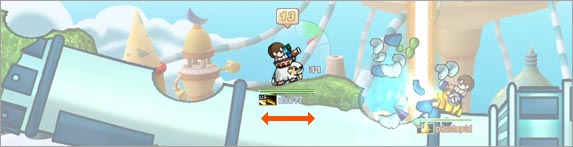 |
| Left / Right Arrow Key |
|
- User can move their mobile by using the Left/ Right Arrow keys on given turn. Mobile can no longer move on given turn when blue bar at the very bottom of screen is depleted. Mobile is disabled when the user’s HP gauge is completely depleted. |
 |
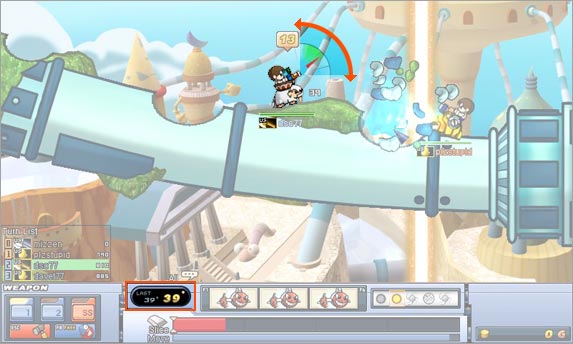 |
| Up / Down Arrow Key |
|
- Appropriate shot angle is needed to successfully hit an enemy. Use the UP/ Down Arrow keys to set a desired angle of trajectory. Green/Red highlighted area refers to the ideal/possible shot angle range. Shooting with the angle in the green area produces more damage. |
 |
 |
| Space bar |
|
- User can fire their weapon by pressing, holding, and releasing the SPACE BAR. The longer the SPACE BAR is held, the farther the shot will travel. Red gauge on the bottom of the screen represents the length of time user held down the SPACE BAR and the expected travel distance of the projectile. |
 |
 |
|
Click on the equipped item on the item slot F1 - F6 Key |
|
- During game play, if items are equipped in the item slots, the user can access those items by either clicking on them with a mouse or by pressing the F1 through F6 shortcut keys. |
Copyright © 2020 BattleBound.
Powered by imds. Todos los Derechos Reservados.